This article discusses how to upload .manifest files for ordering services via FTP.
| Note: Manifest files are only required if your workflow needs cannot be fulfilled with the standard FTP upload method, as explained here. |
Prerequisites
- This is not available to Express customers
Steps to add Order Instructions while Ordering via FTP
1. Connect to your 3Play Project using an FTP client
For instructions, see Steps 1-7 of this article.
- If you are ordering services for new media files, proceed to the next step.
- If you are ordering new services for media files that already exist in your 3Play account, proceed to Step 4.
2. Create hold_for_manifest folder
If you don't already have a folder named hold_for_manifest, create one now in your top-level directory, like so: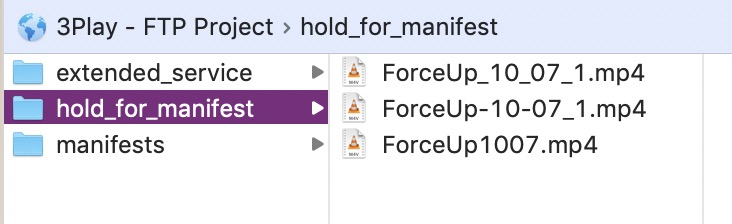
3. Upload a Media File to hold_for_manifest folder
In this example, we have just uploaded the file pictured above named "ForceUp1007.mp4".
- Files uploaded to this folder will not be processed by 3Play until a corresponding manifest has also been uploaded.
4. Create a Manifest
Now we need to create a manifest that tells 3Play what to do with the media file we just uploaded.
- Please see this article for instructions on creating a manifest, then proceed to the next step to upload it.
5. Upload Manifest
Give your manifest a unique name and upload it to your 3Play project in a directory of your choosing.
In this example, we upload our manifest (named "20000001.manifest") into a top-level folder named "manifests" to keep our FTP directory tidy, but this "manifests" folder is not required — you could simply upload your manifest into the top-level directory.
Within a minute or so, you should see the services specified by your .manifest file reflected in your 3Play account.