Learn how caption types differ and explore styling and font options for open captions when ordering through 3Play Media.
Caption Types: Closed vs. Open
Closed Captions are optional—viewers can turn them ON and OFF using their video player’s controls.
Open Captions are “burned in,” meaning they’re permanently part of the video and always visible across all players and devices.
- By default, 3Play will output encoded captions in the same format as the source media that was imported for encoding. That being said, M4V format outputs are also available.
| Tip: Open captions ensure consistent display quality across platforms and give you full control over appearance. |
[Closed Captions vs. Open Captions [00:00:45].]
Open Caption Encoding Styles
We offer several open caption styles to suit your needs:
| Style | Description | Visual |
| Source Open Captions | Captions are burned directly over your original video. | 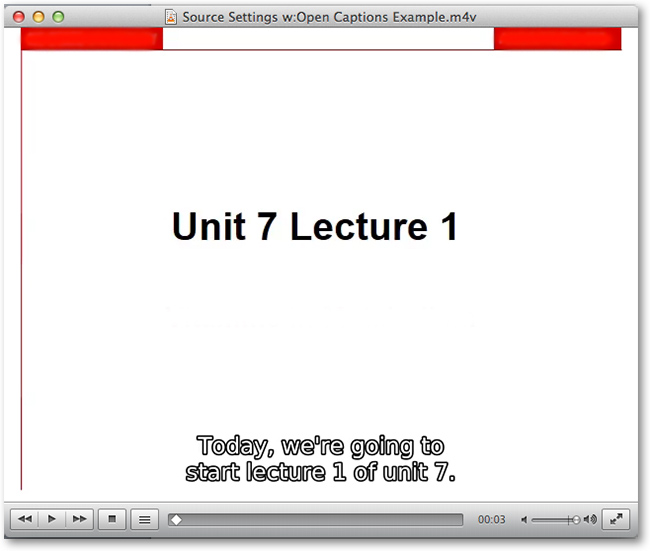 |
| Standout | Caption text appears within a background bar on the video. | 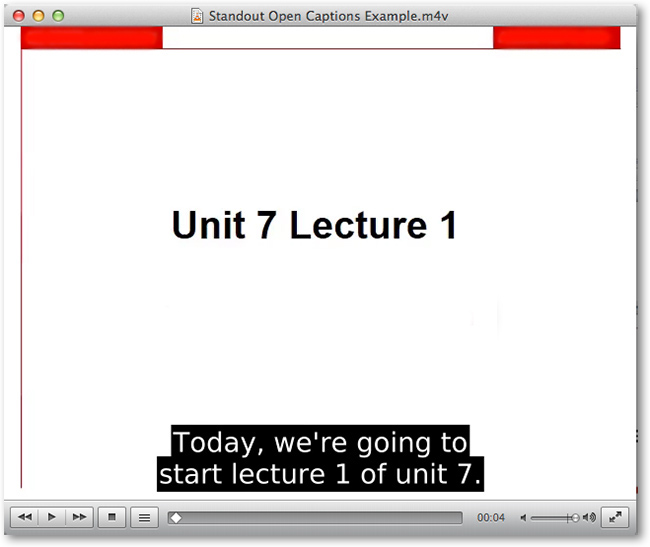 |
| Bottom Bar | Captions are placed in a separate bar at the bottom of the video frame. | 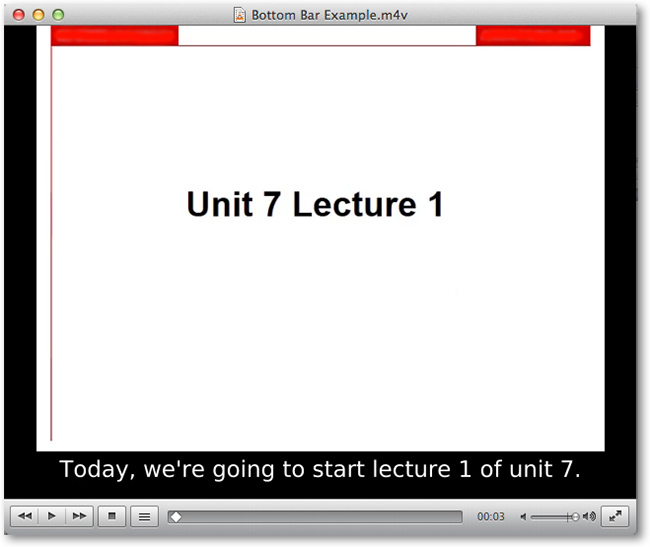 |
| Note: Vertical caption placement is supported for open caption formats, except for Bottom Bar. At this time, M4V cannot be ordered for Standout or Bottom Bar formats. The only way to receive Standout or Bottom Bar encoded captions as an M4V file is to upload the source media in M4V format. |
Open Caption Font Options
You can customize the caption font for enhanced readability. Available font families include:
Font Style |
Visual |
CenturySchL - Bold |
|
CenturySchL - Bold Italic |
|
CenturySchL - Italic |
|
|
CenturySchL - Roma
|
|
Dingbats |
|
Nimbus - Bold |
|
Nimbus - Bold Oblique |
|
Nimbus - Regular |
|
Nimbus - Regular Oblique |
|
NimbusRomNo9L - Medium |
|
NimbusRomNo9L - Medium Italic |
|
NimbusRomNo9L - Regular |
|
NimbusRomNo9L - Regular Italic |
|
NimbusSanL - Bold |
|
NimbusSanL - BoldCond |
|
NimbusSanL - BoldCond Italic |
|
NimbusSanL - Bold Italic |
|
NimbusSanL - Regular |
|
NimbusSanL - RegCond |
|
NimbusSanL - RegCond Italic |
|
NimbusSanL - Regular Italic |
|
StandardSymL |
|
URW Bookman - DemiBold |
|
URW Bookman - DemiBold Italic |
|
URW Bookman - Light |
|
URW Bookman - Light Italic |
|
URW Chancery - Medium Italic |
|
URW Gothic - Book |
|
URW Gothic - Book Oblique |
|
URW Gothic - Demi |
|
URW Gothic - Demi Oblique |
|
URW Palladio - Bold |
|
URW Palladio - Bold Italic |
|
URW Palladio - Italic |
|
URW Palladio - Roma |


To change the font family used in your caption encodings, contact support@3playmedia.com with the name of your desired font.
You also have the option to adjust font size on a per-file basis (32px shown in examples). See this article for instructions.