The transcript alignment service is fully automated, and output quality depends on how closely the submitted source text follows our best practices. If best practices aren’t followed, the result may include sync issues or text encoding errors.
You can configure Alignment Settings so that when problems are detected, files are placed in the Review Alignment File state instead of being finalized. In this state, you can:
Fix the source text and resubmit for alignment
Cancel the request
Finalize as is
Discard the source text and submit only the media file for standard transcription and captioning
Prerequisites
- This service is not available to Express account types.
Steps to configure settings for alignment service uploads.
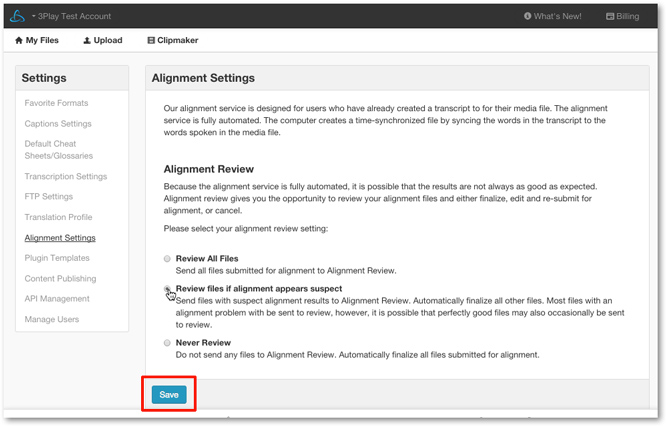
1. Click Settings

2. Click Alignment Settings

3. Choose a setting
By default, Never Review is selected, meaning that all alignment requests finalize regardless of any discrepancies detected in the source text.
- Select Review All Files to have all alignment uploads sent to the Review for Alignment state.
- Select Review files if alignment appears suspect to send requests with possible mismatched text and/or encoding problems to the Review Alignment File state, but automatically to finalize files if our algorithm indicates they are well aligned.
-
After choosing a setting, click Save.
Next steps
See more information on working with requests sent to the Review Alignment Files state